How to Mount a Vizio Soundbar
You unboxed your Vizio soundbar, placed it on the shelf, and stared at the wires dangling toward the TV. You want it mounted properly, but you are not sure whether to put it on the wall or attach it directly to the TV. The first thing you need to know is that Vizio soundbars do not all use the same mounting method. The steps change depending on your soundbar model, your TV brand, and which mounting hardware came in the box.
I have mounted several Vizio soundbars on different TVs and walls. After doing it myself a few times, I learned that the biggest mistake is jumping straight to drilling holes without checking the brackets first. So let me walk you through the process from start to finish. You will know exactly what to do for your specific setup.
Assess Your Soundbar Model and Mounting Options
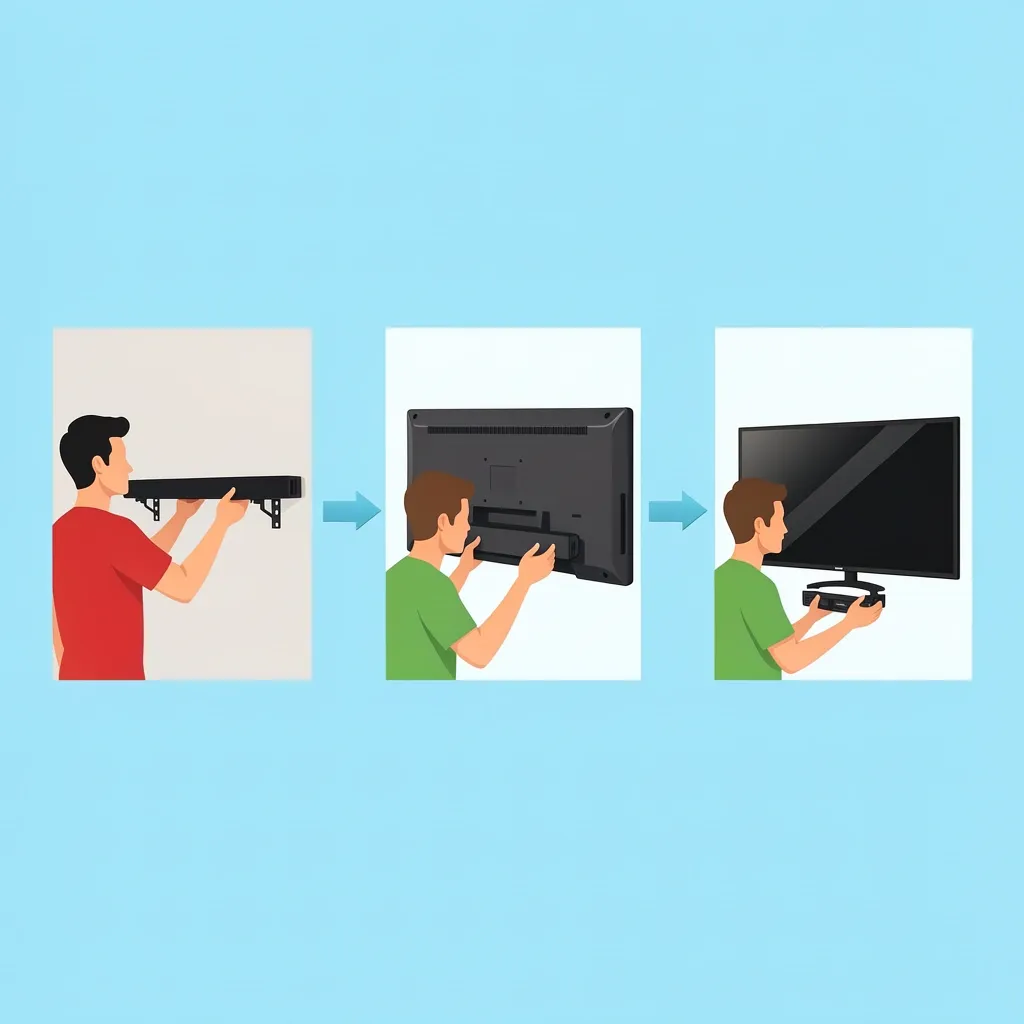
Before you pick up a drill, find the model number of your soundbar. It is usually printed on a sticker on the back or on the side of the original box. The model tells you which mounting brackets are included and whether you can attach the soundbar to a Vizio TV without extra parts.
Most Vizio soundbars follow one of three paths:
- Wall mounting – The soundbar comes with brackets that screw into the back or bottom of the bar, then hang on a wall plate.
- TV mounting using Vizio’s proprietary plate – Only works with specific Vizio TV models that have a V-slot on the back. The soundbar slides or clips into a bracket that attaches to the TV.
- Universal mounting – For non‑Vizio TVs or when the soundbar does not have a dedicated Vizio mount. You need an aftermarket soundbar bracket that connects to the TV’s VESA holes.
Here is a quick decision table to help you identify your path:
| Soundbar Series | Common Models | Included Mounting Hardware | Recommended Method |
|---|---|---|---|
| V‑Series (2.0 / 2.1) | V21‑H8, V20‑JA | Two L‑shaped brackets, screws, wall plate | Wall mount (brackets pre‑attached on some models) |
| M‑Series (3.1 / 5.1) | M213a‑K8, M51a‑H6 | Two brackets (may require separate wall‑mount kit) | Wall mount or optional Vizio TV plate (sold separately) |
| 5.1 Systems (SB3651, SB3851) | SB3651‑E6, SB3851‑C0 | No brackets in box – only keyhole slots on back | Wall mount with aftermarket bracket or VESA adapter |
| All‑in‑One (OLED Companion) | Vizio Elevate, P‑Series | Proprietary sliding bracket for Vizio TV | TV mount if Vizio TV; otherwise wall mount with universal kit |
If your soundbar has no mounting holes at all, check the foam or accessory bag inside the box. Some models hide small adapters that click into the soundbar’s chassis. Do not throw away the packaging until you confirm what you have.
Model-Specific Variations (What Frustrates Most People)
I once helped a friend mount his Vizio SB3651. The brackets he expected were not there. Instead, the soundbar had two small keyhole slots on the back panel. We had to buy a universal soundbar mount that screwed into those slots. This is common for older 5.1 systems.
For newer V‑Series models, the brackets are usually already attached to the bottom of the soundbar. You just need to unscrew them, mount the wall plate, and reattach the soundbar. If you own an M‑Series from 2022 or later, check the box for a separate “wall mount template” paper. The screws for the brackets are often in a small plastic bag, not inside the soundbar itself.
If your soundbar came with rubber feet on the bottom, do not remove them unless the mounting instructions specifically say to. The feet are designed to stay on for wall mounting on some models to keep the soundbar slightly away from the wall for cooling and sound dispersion.
Prepare Tools and Estimate Your Setup
Once you know your mounting path, gather these tools:
- Power drill with drill bits for your wall material (drywall, concrete, or brick)
- Stud finder (for wall mounting)
- Level (a small bubble level or a phone app)
- Measuring tape
- Screwdriver (Phillips or flathead, depending on screws)
- Cable ties or cable raceway kit
- Pencil for marking holes
Now decide where the soundbar will sit. The ideal spot is directly below the TV, centered horizontally, and about 2 to 4 inches below the bottom edge of the TV. If your TV is mounted high (above eye level), you can place the soundbar above the TV instead, but then you need a tilt mount to angle the sound downward toward your ears.
Wall Material Considerations
For drywall, use wall anchors if you cannot hit a stud. A soundbar is light (most weigh under 10 pounds), so plastic anchors are usually enough. For plaster or tile, use a masonry bit and toggle bolts. For brick or concrete, use a hammer drill and expansion anchors. Never drill into drywall without checking for electrical wires or pipes behind it – use a stud finder with wire detection.
If you are mounting the soundbar on a finished wall that already has the TV mounted, you might be able to use the same studs. But make sure the soundbar brackets do not block the TV’s cables coming down.
Step-by-Step: Wall-Mounting Your Vizio Soundbar
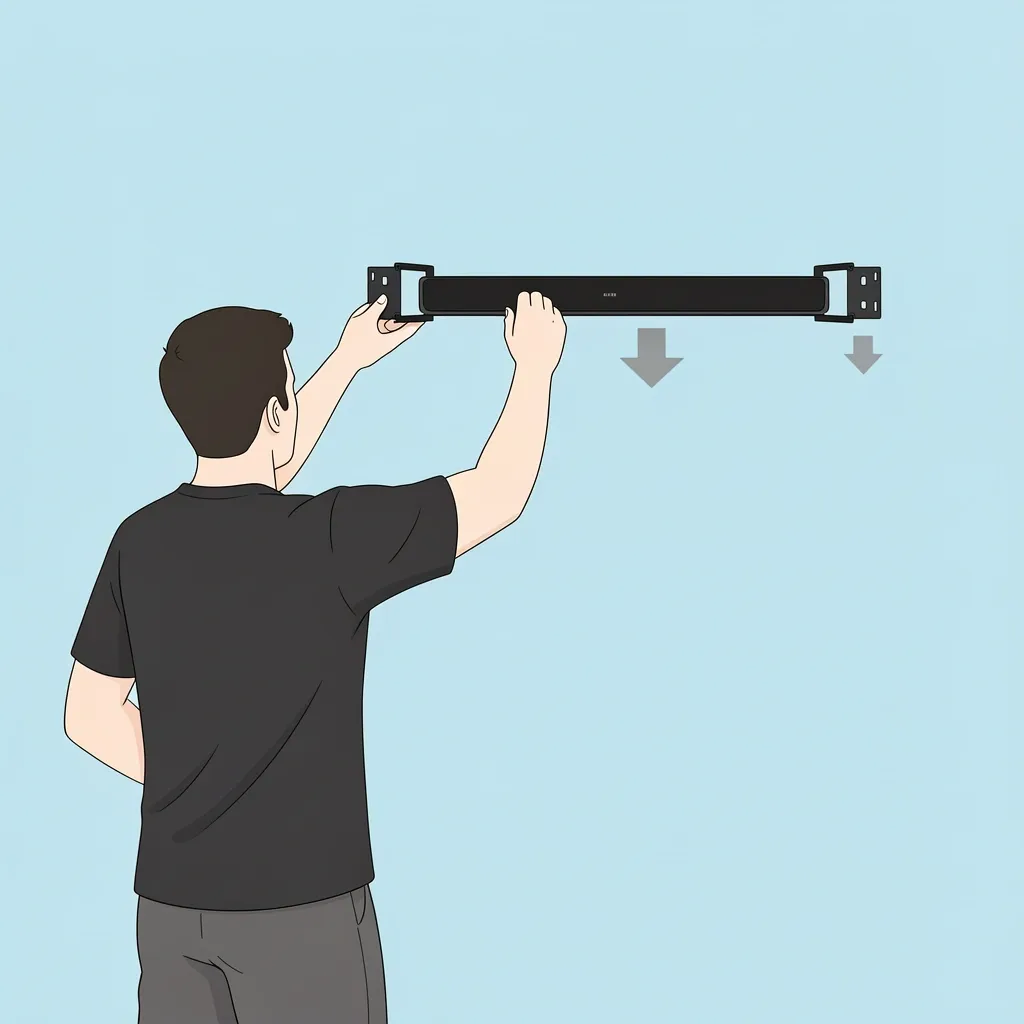
Follow these instructions if you are attaching the soundbar directly to the wall (the most common method). The steps assume you have the brackets that came with the soundbar or a universal wall‑mount kit.
- Attach the brackets to the soundbar. Most Vizio brackets screw into the back or bottom. Use the screws provided. Tighten them snugly but do not overtighten – you do not want to strip the plastic threads on some models.
- Measure and mark the wall. Hold the wall plate (or the soundbar with brackets attached) against the wall at your chosen height. Use a level to make sure it is straight. Mark the screw locations with a pencil.
- Drill pilot holes. Use a drill bit slightly smaller than your wall anchors or screws. If you hit a stud, drill directly into the wood. For drywall without a stud, insert wall anchors first.
- Secure the wall plate. Screw the wall plate into the anchors or studs. Tighten until the plate does not wiggle.
- Hang the soundbar. Lift the soundbar and align its brackets with the slots on the wall plate. Push downward or slide until you hear a click. Give it a gentle tug to confirm it is locked.
- Check clearance. If your soundbar has bottom‑facing drivers or a passive radiator (common on larger models), maintain at least 2 to 3 inches of space between the back of the soundbar and the wall. This prevents muffled audio and overheating.
If your soundbar uses keyhole slots instead of brackets, you will need a wall plate with screws that sit inside the slots. Many universal soundbar mounts come with a selection of screws and spacers.
Step-by-Step: Mounting to a Vizio TV (Proprietary Plate Method)
This method only works if you own a Vizio TV that has a V‑slot on the back – a small recessed area designed to accept a Vizio soundbar bracket. Look at the back of your TV near the VESA mounting holes. If you see a rectangular cutout with two small screw holes, you are good to go.
Vizio sells separate mounting plates called “Sound Stand” or “Slim Shelf” for specific soundbar models. If you did not receive one in the box, you can buy it from Vizio or a third‑party seller. Do not try to glue or tape the soundbar to the TV – that can crack the TV panel.
- Remove the TV from its stand or wall mount if necessary. You need access to the back of the TV. Lay the TV face‑down on a soft surface.
- Attach the V‑slot plate to the TV. Align the plate with the cutout on the back of the TV. Use the screws that came with the plate. Tighten until the plate is flush.
- Attach the soundbar to the plate. Depending on your model, the soundbar either slides into a channel or clicks onto clips. Follow the instructions that came with the plate. Soundbars with bottom‑facing drivers may need spacers to keep the bar level.
- Re‑mount the TV. Put the TV back on its stand or wall bracket. The soundbar should now sit directly below the TV, looking like one unit.
What If Your TV Is Already Wall‑Mounted?
If the TV is already on a wall mount, you cannot use the proprietary V‑slot method because you cannot access the back easily. Instead, buy a universal soundbar mount that attaches to the TV’s VESA arms. These mounts clamp onto the VESA bolts and extend downward to hold the soundbar. This is a clean look and does not require drilling into the wall again.
For non‑Vizio TVs, the same VESA‑mount bracket works. Just make sure the bracket supports your soundbar’s weight and the soundbar’s screw spacing matches the bracket’s holes.
Warning: Never drill screws into the back panel of a TV. The holes you see are the only safe points. Drilling elsewhere can damage internal components or the screen.
Cable Management and Sound Setup
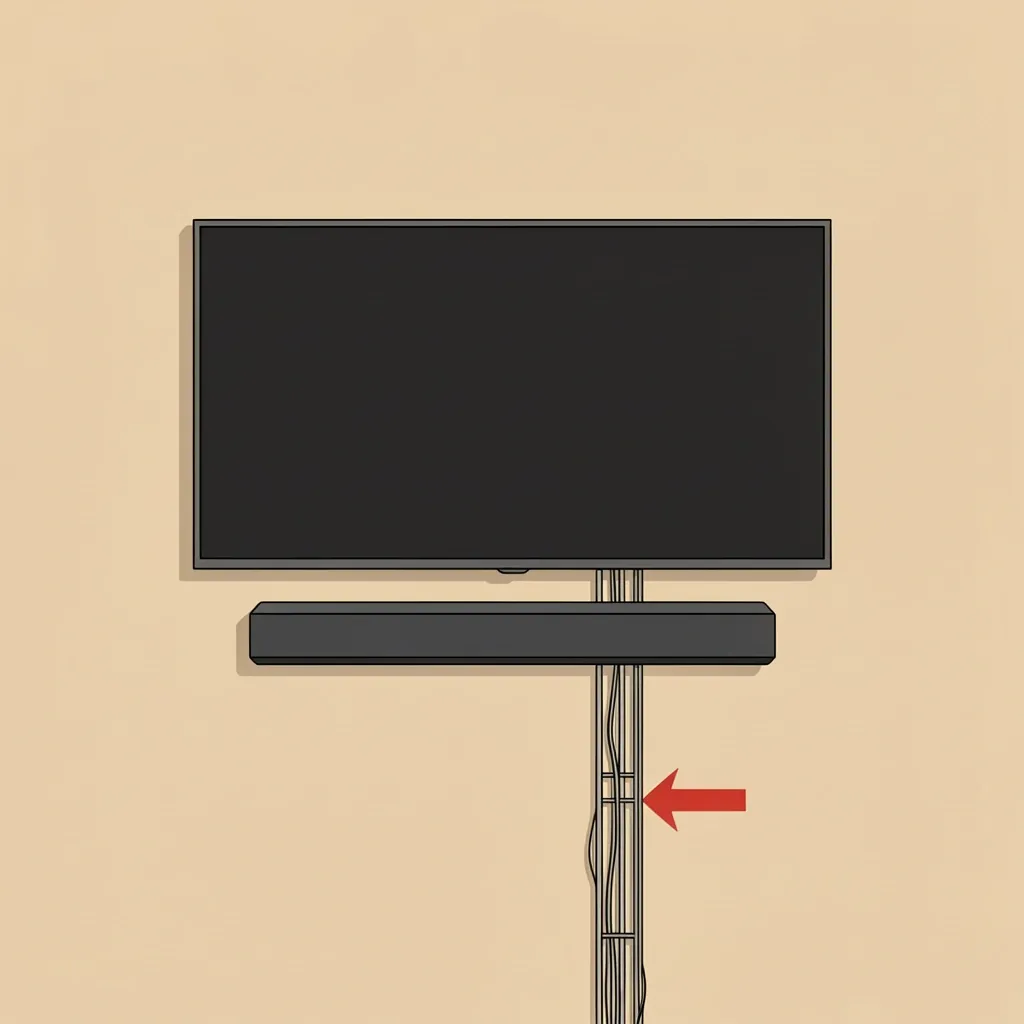
A mounted soundbar looks great until cables hang everywhere. Here is how to keep it tidy.
- Use a cable raceway kit that hides the wires inside a plastic channel stuck to the wall. Paint the channel to match your wall color.
- For HDMI ARC and optical cables, run them behind the soundbar first, then down the wall. If you are routing inside the wall, check local building codes – some areas require in‑wall rated cable or a special kit with a cover plate.
- Do not pinch the soundbar’s power cable between the soundbar and the wall. It can damage the insulation.
- After mounting, connect the HDMI ARC cable to the TV’s ARC port (usually labeled). This allows the TV remote to control the soundbar volume.
Audio Calibration After Mounting
Once the soundbar is in place, play some music or a movie. If the sound feels boomy or tinny, check that the soundbar is not too close to the wall. Also ensure the soundbar is level – even a slight tilt can make dialogue sound off. If you mounted the soundbar above ear level, angle it downward using a tilt mount or by placing small foam shims under the rear feet.
For Vizio soundbars with a subwoofer, the subwoofer connects wirelessly. Place it on the floor near the TV, but not inside a cabinet or directly against a wall – the bass will be muddy otherwise.
Frequently Asked Questions
Can I mount a Vizio soundbar above a non‑Vizio TV?
Yes, but you will need a universal soundbar mount that attaches to the TV’s VESA holes or a wall‑mount bracket. Do not try to balance the soundbar on top of the TV – it is not safe.
Do I need to remove the rubber feet from the soundbar before mounting?
Only if the mounting instructions say so. On many Vizio models the rubber feet are part of the design and help with vibration isolation. Removing them can cause rattling or block the vents.
How do I mount a Vizio soundbar if my TV is already mounted on a full‑motion arm?
Use a VESA soundbar mount that clips onto the arm’s bracket. These mounts extend below the TV and hold the soundbar. Ensure the arm can handle the extra weight.
What is the maximum weight the included wall brackets can hold?
Most Vizio wall brackets are rated for soundbars up to 12–15 pounds. If your soundbar is heavier (like some 5.1 models with built‑in subwoofers), buy a heavy‑duty universal mount.
Will mounting the soundbar void the warranty?
No, as long as you use the mounting holes or brackets provided by Vizio. Drilling extra holes into the soundbar chassis will void the warranty. Always follow the instructions in the manual.
My Vizio soundbar has no mounting holes – what should I do?
Some models use keyhole slots that are recessed under the rubber feet. Peel back the feet gently to check. If there are still no holes, the soundbar likely sits on a shelf or uses a special Vizio TV plate. You can buy a universal soundbar mount that uses a clamp around the bar, but make sure it does not block any vents.
How do I hide the power cable for a wall‑mounted soundbar?
Use a cable raceway attached to the wall. If you want a completely invisible look, hire an electrician to install an in‑wall power outlet behind the soundbar. Never run the power cable inside the wall without proper rated cable and a permit.